

A dash cam that only records while you drive misses half the story. Door dings in a parking lot, a hit-and-run on the street overnight, someone trying the handles at 3 a.m.: all of that happens with the engine off.
Parking mode fixes that, but it needs power when the car is off. Plug the camera into an always-live socket and leave it, and sooner or later you get a car that won’t start.
The answer is to hardwire the camera through a cable that watches the battery voltage and shuts the camera off before the battery gets too low. Here is how to do it properly, what you need, and the settings that keep you out of trouble.
Disclosure: GarageWise is reader-supported. As an Amazon Associate we earn from qualifying purchases, at no extra cost to you.
Why a hardwired dash cam can drain a battery
A dash cam in parking mode only draws a small amount of current, but it draws it for hours. Over a weekend at the airport, that adds up.
Three things make it worse:
- Short trips. Ten minutes to the store doesn’t give the alternator time to put back what the camera took overnight.
- Cold weather. A cold battery has less usable capacity, and the engine needs more from it to start.
- An aging battery. A four- or five-year-old battery may look fine on a daily commute and still fold after one long night of parking mode.
That is why the cutoff voltage matters more than anything else in this job.
Three ways to power parking mode
| Method | How it works | Pros | Cons |
|---|---|---|---|
| Fuse-box hardwire kit | Taps a constant fuse and an ignition-switched fuse, with a voltage cutoff in the cable | Hidden wiring, cheap, works with most cameras | You have to find the right fuses |
| OBD-II power cable | Plugs into the diagnostic port under the dash | No fuse box work, easy to remove | Bulky plug near your knees, check your vehicle warranty terms |
| Dedicated dash cam battery pack | A separate battery charges while you drive and runs the camera when parked | Car battery is never touched | Costs more, another box to mount |
Most people end up with the first option. The OBD route is a good shortcut if the fuse box scares you or the car is a lease.
What you’ll need
- A hardwire kit made for your camera’s connector (USB-C, mini-USB or a brand-specific plug) with an adjustable low-voltage cutoff.
- Add-a-circuit fuse taps that match your car’s fuse type: ATO/ATC, mini, low-profile mini or micro2. Pull a fuse and look before you buy.
- A multimeter or 12 V circuit tester to find which fuses are live with the key off and which only come on with the ignition.
- A plastic trim tool for tucking cable into the headliner and pillar trim.
- A few zip ties, and your owner’s manual open to the fuse box diagram.
The hardwire kit: VIOFO HK4
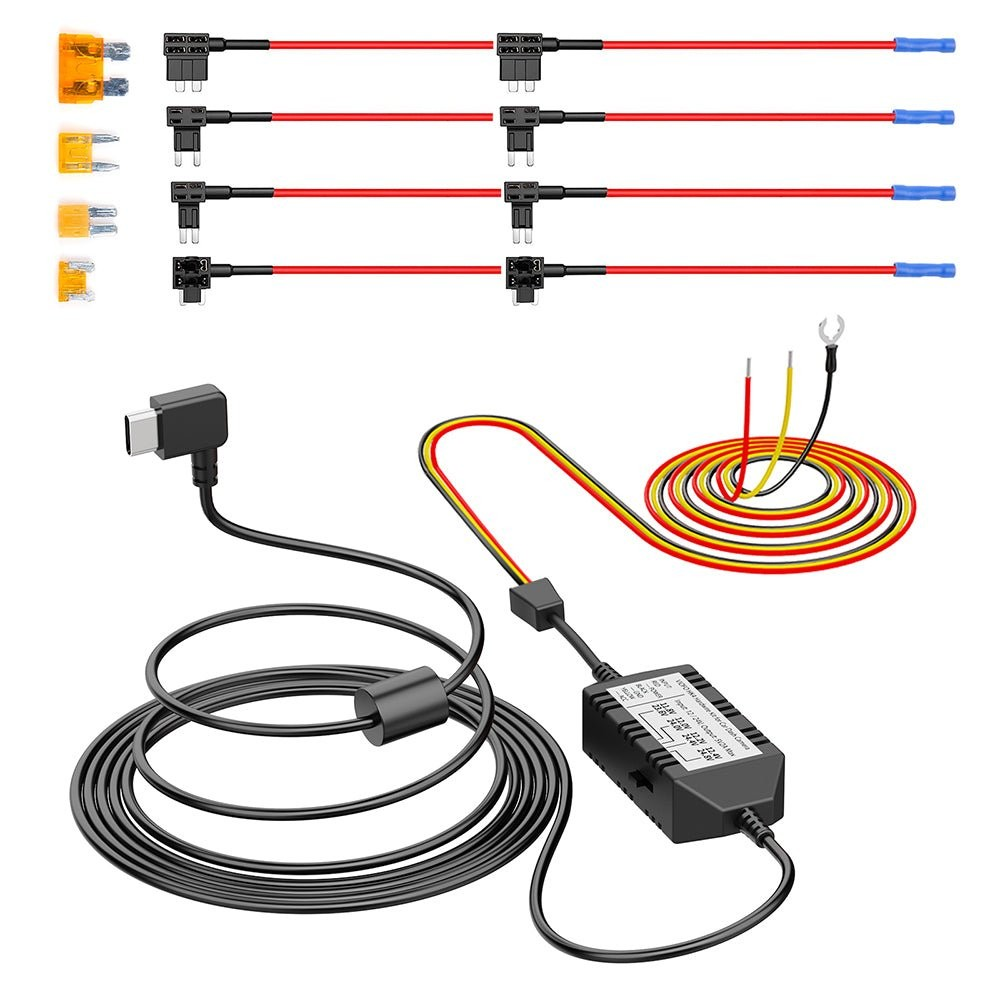
If you own a recent VIOFO camera with a USB-C power port, the HK4 is the kit VIOFO designed for it. VIOFO lists it for the A119 Mini 2, A229 and A329 series, T130 and WM1.
It works the way a good hardwire kit should. One lead goes to a constant fuse, one to an ignition-switched (ACC) fuse, and one to ground. When you shut the engine off, the camera sees the ACC line drop and switches into parking mode. When you start the car, it goes back to normal recording.
The important part is in the converter box: VIOFO gives you four selectable cut-off voltages. When the battery falls to the one you pick, the HK4 stops powering the camera. It also handles 12 V and 24 V vehicles.
VIOFO sells it on its own site for $25.99 with an 8-piece fuse tap set that covers the common fuse sizes, or slightly less with just two taps of one size.
Good to know: Amazon has several look-alike “HK4” kits from other sellers. Make sure the listing is VIOFO’s own before you buy.
Running a VIOFO with USB-C power? The HK4 adds parking mode with a battery cutoff you choose.
Search VIOFO HK4 on Amazon →The no-fuse-box shortcut: Garmin Constant Power Cable
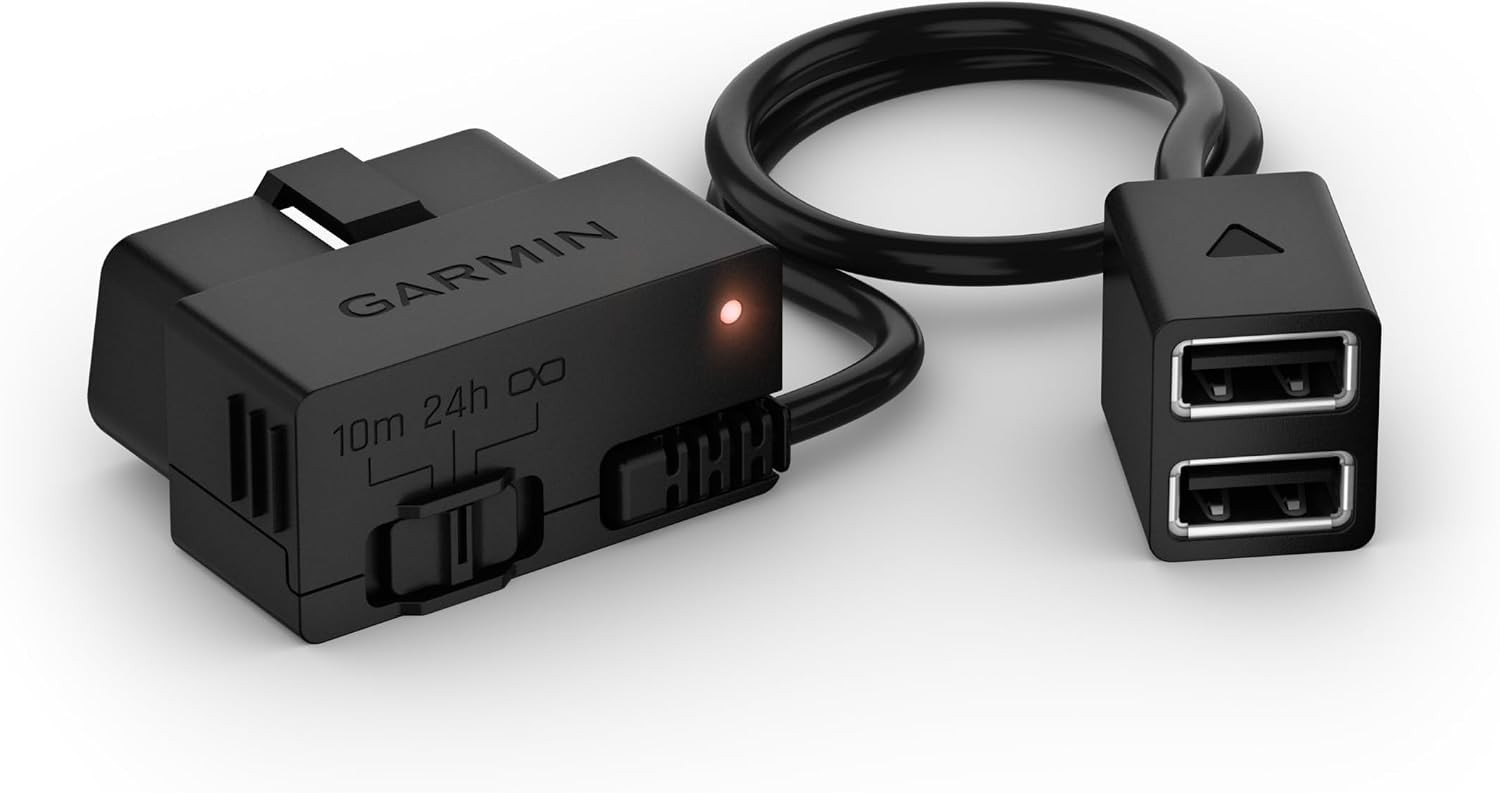
Garmin’s Constant Power Cable plugs into the OBD-II port, which is usually under the dashboard on the driver’s side. Your Garmin dash cam’s USB cable plugs into it. No fuse taps, no ground wire.
A small switch on the plug sets how long it keeps supplying power after you leave the car: 10 minutes, 24 hours, or always on. It re-enables power when it senses motion or when you restart the car, and it can run up to two cameras.
Garmin’s manual lists the low-battery protection at 12 V: below that, the cable shuts itself off to protect the battery. That is a fairly conservative threshold, which is what you want if you’re unsure how healthy the battery is.
Good to know: Garmin itself says to check your vehicle’s warranty terms before using any OBD-II device, and to unplug it if you notice any change in how the engine runs. On some cars the OBD port also sits right where your knee goes.
Rather not open the fuse box? Garmin’s OBD-II cable gives a Garmin dash cam parking power with a built-in 12 V cutoff.
Check Price on Amazon →The tool that makes it easy: a multimeter

Guessing at fuses is how people end up with a camera that never turns off, or one that never comes on. A basic multimeter takes the guesswork out, and you will use it for battery checks for years.
Klein Tools’ MM325 is a solid, inexpensive choice. It is a manual-ranging meter that measures up to 600 V AC/DC and 10 A DC, checks continuity and batteries, has a backlit display for reading under a dark dashboard, and is built to survive a 6.6-foot drop.
Lead Alert LEDs show which jacks the test leads belong in, which helps if you only pick a meter up a few times a year.
Need to find the right fuse? A meter like the MM325 tells you in seconds which slots are constant and which are switched.
See the Klein MM325 →Step by step: hardwiring through the fuse box
Every car is different, so keep the owner’s manual handy. The process looks like this:
- Plan the cable route first. From the camera, tuck the cable into the headliner, down the passenger-side A-pillar trim, along the door seal and into the fuse box area. If the pillar has a curtain airbag, route the cable behind the airbag, not across the front of it, and clip it to existing wiring.
- Find a constant fuse and an ignition fuse. With the key out, use the meter (black lead on bare metal) to probe both test points on top of each fuse. A fuse that shows battery voltage with the key off is constant. Then turn the ignition on and look for one that only goes live now.
- Skip the safety-critical circuits. Avoid airbag, ABS, fuel pump and engine computer fuses. Good candidates are things like the cigarette lighter, sunroof, power mirrors or the radio, depending on the car.
- Install the fuse taps the right way round. Check which side of the empty fuse slot is live with the meter and insert the tap so its feed leg sits on the live side. The original fuse goes in one slot of the tap, and the dash cam’s fuse in the other.
- Ground to bare metal. Use an existing chassis bolt near the fuse box. A painted bracket or a plastic panel isn’t a ground.
- Set the cutoff voltage on the kit before you close everything up (more on picking it below).
- Test. Start the car and confirm normal recording. Turn it off and confirm the camera drops into parking mode. Only then put the trim back.
Picking a cutoff voltage
A healthy 12 V lead-acid battery sits around 12.6 V when fully charged and rested, and somewhere near 12.2 V at roughly half charge. The further you let it fall, the harder the next cold start and the more you wear the battery.
So the rule is simple: the higher the cutoff, the less parking footage you get and the safer the battery is.
- Pick the highest setting in winter, on short-trip cars, and on any battery more than three or four years old.
- Only use a lower setting if the car is driven long distances most days and the battery is healthy.
- If you park for days at a time, use the camera’s own parking timer as a second limit, so it stops after a set number of hours regardless of voltage.
If the battery still goes flat
Sometimes the cutoff works perfectly and the car still struggles. Usually it is one of these:
- The battery was already weak. Have it load-tested. Parking mode tends to expose a battery that was on its way out.
- Both leads are on constant fuses. The camera never sees the ignition go off, so it doesn’t switch modes properly. Recheck with the meter.
- The car sits for a long time. For a car parked for a week or more, either turn parking mode off or connect a battery maintainer while it sits. We cover who needs one in our guide to battery chargers and maintainers.
Done carefully, hardwiring takes an afternoon and leaves you with a tidy install, no cable dangling to the 12 V socket, and a camera that watches the car when you can’t, without leaving you stranded the next morning.
If a warning light shows up after wiring work, a code reader tells you where to look: Best OBD2 Scanners for Home Mechanics.
Related: Bluetooth OBD2 Adapter vs Handheld Scanner
Related: Best Dash Cams Under $100
Related: Using a Multimeter to Track Down Car Electrical Problems